
Patient Support FAQs
There were no results for
Please try rewording your query, or try our search.
Getting Started
The Zio monitor is an ECG monitor that continuously records the electrical activity of the heart.
Press the button on your Zio monitor any time you feel a symptom, then log your symptom in the Symptom Log provided with your Zio monitor.
Zio monitor
The Zio monitor is an ECG monitor that continuously records the electrical activity of the heart.
You will not see any lights or hear any sounds when your Zio monitor is functioning properly.
The Zio monitor does not use Wi-Fi, Bluetooth, or other cellular technology. If proof of design is required by your employer or similar authority, please email us at supportES@irhythmtech.es, supportNL@irhythmtech.nl, supportCH@irhythmtech.ch, and supportAT@irhythmtech.at
- Do not expose the Zio monitor to a magnetic resonance imaging (MRI) environment. Thermal injury and burns may occur due to the metal components of the Zio monitor patch that can heat during MR scanning
- Do not wear the Zio monitor during external cardiac defibrillation
- Do not wear the Zio monitor during a procedure using high-frequency surgical equipment
- Do not use the Zio monitor on patients with a neurostimulator, as it may disrupt the quality of ECG data
After you post your Zio monitor back to iRhythm we will review the data and send a comprehensive report to your healthcare provider. Your healthcare provider will let you know when they are ready to review the results with you.
Your Activities
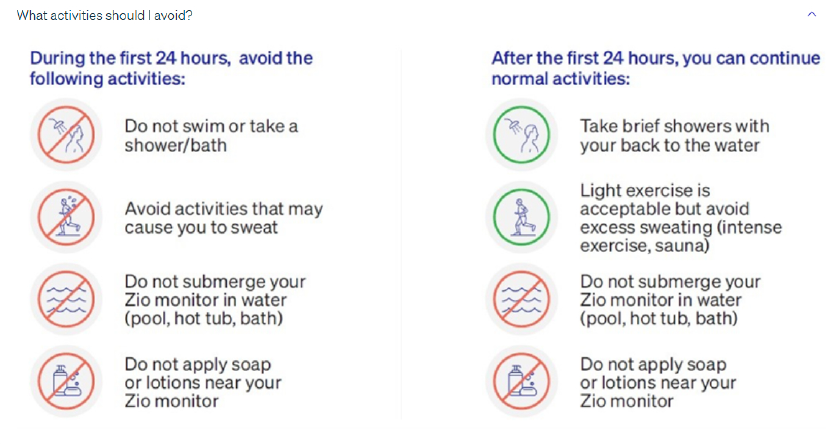
During the first 24 hours, avoid activities that may cause you to sweat.
After the first 24 hours, light exercise is acceptable but avoid excess sweating (intense exercise, sauna).
During the first 24 hours, do not swim or take a shower/bath.
After the first 24 hours, take brief showers with your back to the water.
While towel drying after a shower, the patient should hold the Zio monitor with one hand.
Do not submerge your Zio monitor in water (pool, hot tub, bath).
Do not submerge your Zio monitor in water (pool, hot tub, bath).
Recording Symptoms
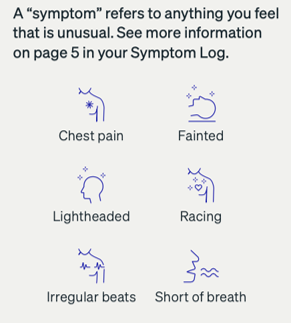
- Press the button on your Zio monitor when you feel a symptom.
- The light does not flash when the button is pressed
- If you forget to either press the button or log a symptom, the Zio monitor is recording the ECG data
- Log the symptom in the Symptom Log with the following information:
- Date and time of button press
- Reason for button press (Chest Pressure or pain, fast heartbeat, fainted, dizzy, palpitations, short of breath, accidental button press, other)
- Duration of symptom
- Activity when the symptom was experienced (for example, while sleeping, resting, or exercising)
- Any writing outside of the requested entries on the Symptom Log or on any materials included with the device will not be documented or shared
If you forget to either press the button or log a symptom, the Zio monitor is recording the ECG data. Do not be concerned if you forget to press the button.
If you forget to either press the button or log a symptom, the Zio monitor is recording the ECG data. Do not be concerned if you forget to log a symptom.
Logging symptoms provides the healthcare provider with additional information to help analyze the patient’s health condition and develop a plan of care. Not all patients experience symptoms.
End of the Wear Period
The Zio monitor is an ECG monitor that continuously records the electrical activity of the heart. It is intended to be worn continuously for a time period specified by a provider for up to 14 days.
It is expected for your Zio monitor to flash orange as you remove it. It is okay to mail the device while it is flashing.
Zio monitor Troubleshooting
Massage the wings of the patch for 3 to 5 minutes to re-stick.
If your Zio monitor has fallen off, call Customer Care at Austria: 0800 018108, Netherlands: 0800 0221642, Spain: 900721451, and Switzerland: 0800 562826
Call Customer Care at Austria: 0800 018108, Netherlands: 0800 0221642, Spain: 900721451, and Switzerland: 0800 562826
Yes, the wings of the Zio monitor may become less transparent after a few days of wear.
Yes. The patch may move slightly from its original position.
If allergic symptoms, severe skin irritation, or signs of skin infection develop, remove the device from the patient’s chest and discontinue wear.
Flashing Lights
If an orange light is rapidly flashing (3 flashes per second):
- This indicates your Zio monitor is not working
- Call Customer Care at Austria: 0800 018108, Netherlands: 0800 0221642, Spain: 900721451, and Switzerland: 0800 562826
If an orange light is slowly flashing:
- This indicates your Zio monitor is not well attached to your skin. It does not mean something is wrong with your heart
- Massage the adhesive wings for 3-5 minutes until the orange light disappears to secure your Zio monitor to your skin
- If flashing persists or reoccurs, call Customer Care at Austria: 0800 018108, Netherlands: 0800 0221642, Spain: 900721451, and Switzerland: 0800 562826
Traveling with your Zio monitor
If you are questioned about your Zio monitor, show the Security Screening Statement found in your Symptom Log.
SECURITY SCREENING STATEMENT
This person is wearing an iRhythm Zio monitor as prescribed by their physician. The Zio monitor is adhered to their chest, recording their heartbeat, and can only be removed at the direction of their physician.
If you have questions, call Customer Care 24/7 at Austria: 0800 018108, Netherlands: 0800 0221642, Spain: 900721451, and Switzerland: 0800 562826
Removing and Returning the Zio monitor
At the end of your prescribed wear time, open the adhesive remover and follow steps below to peel off your Zio monitor
- Gently lift the center of your Zio monitor up
- Starting from the centre, use the adhesive remover to wipe the area between your skin and the Zio monitor (Adhesive remover is not supplied in Switzerland. In this case wipe the skin with a cotton pad moistened with a pure brand of baby oil or petroleum jelly)
- Continue to wipe as you peel off your Zio monitor, one side at a time
- Keep your Zio monitor aside for return and refer to the next section for further instructions
- Finally, wash your skin with mild soap, rinse with water, and pat dry
It is expected for your skin to feel slightly irritated after removing your Zio monitor.
It is expected for your Zio monitor to flash orange as you remove it.
For more information on how to remove your Zio monitor, view the “Removing and Returning your Zio monitor” video here.
- Locate your monitor box with the prepaid label. Retrieve your monitor and Symptom Log. If the monitor box is damaged or lost, contact Customer Care 24/7 at Austria: 0800 018108, Netherlands: 0800 0221642, Spain: 900721451, Switzerland: 0800 562826
- Complete the Symptom Log cover. When you remove the monitor, write the Date removed on the front cover of your Symptom Log
- Fill out the survey in the Symptom Log to tell us about your experience. Place the symptom log in the box with the Zio monitor
- Confirm the monitor is adhered to the outline on the device box. Place your Symptom Log on top
- Close and seal the box. Peel the strip from the box to expose the adhesive. Press the lid against the adhesive to seal the box
- Return the prepaid monitor box immediately via any mailbox or post office. A postage-paid shipping label is on the outside of the box. It is okay to mail your Zio monitor if it’s flashing orange
Send the box promptly so your healthcare provider can share results with you as soon as possible.
For more information on how to return your Zio monitor, view the “Removing and Returning your Zio monitor” video here.
If you need a replacement return label to mail your Zio back, please call iRhythm Customer Care at Austria: 0800 018108, Netherlands: 0800 0221642, Spain: 900721451, Switzerland: 0800 562826.
Contraindications, Warning and Safety Information
For contraindications, warnings, and safety information, please view the Zio Monitor Instructions for Use
Customer Care
Call customer care in Austria: 0800 018108, Netherlands: 0800 0221642, Spain: 900721451, and Switzerland: 0800 562826
Call us if you are experiencing any of the following:
- The Zio monitor fell off
- Severe skin irritation
Email SupportES@irhythmtech.es, supportNL@irhythmtech.nl, supportCH@irhythmtech.ch, and supportAT@irhythmtech.at
WEB0221.01